



历史记录
文本、图片、链接、颜色和文件就在刘海下方,并显示来源 App 和时间。
了解更多请在周四之前把设计稿发回来。
Slack · ⌘1
#F4C95D
Figma · ⌘2
确认 10:00 的演示。
Chrome · ⌘3
快捷键
⇧⌘V 打开刘海 · ⌘1–9 快速粘贴
 NotchLingo
在每个 App 中即时翻译:ChatGPT、Chrome、Slack、PDF。你复制的一切都留在刘海里,一键粘贴。
macOS 14+支持 Apple Silicon 与 Intel月付、年付或终身买断 ›
在哪里阅读,就在哪里翻译
无需复制,无需新开标签页。在任何 App 中选中文字,轻点 Shift,译文就会出现在光标旁边,还附带发音、词性和例句。
The model can make mistakes. Check important info before you rely on it.
NotchLingoEnglish → 简体中文可能会出错
译文直接弹出在光标旁边。已经是你的语言了?它会自动帮你切换翻译方向。
文本、链接、颜色、图片和文件,连同来源 App 一并保存。 抬眼一看,点击粘贴。
确认周五上午 10:00 的演示。
Slack · 刚刚⌘1
const t = await translate(text, 'vi')
VS Code · 4 分钟⌘2
#1F4E79
Figma · 8 分钟⌘3
notchlingo.com/pricing
Chrome · 12 分钟⌘4
鼠标悬停在刘海上,或按 ⇧⌘V。⌘1–9 快速粘贴,⌘P 固定。
Screenshots
Capture an area, a window or the whole screen, then point things out in seconds: arrows, numbered steps, callouts, spotlight and magnifier. Hide emails and faces automatically, translate the text inside the image, drop it on a beautiful background.
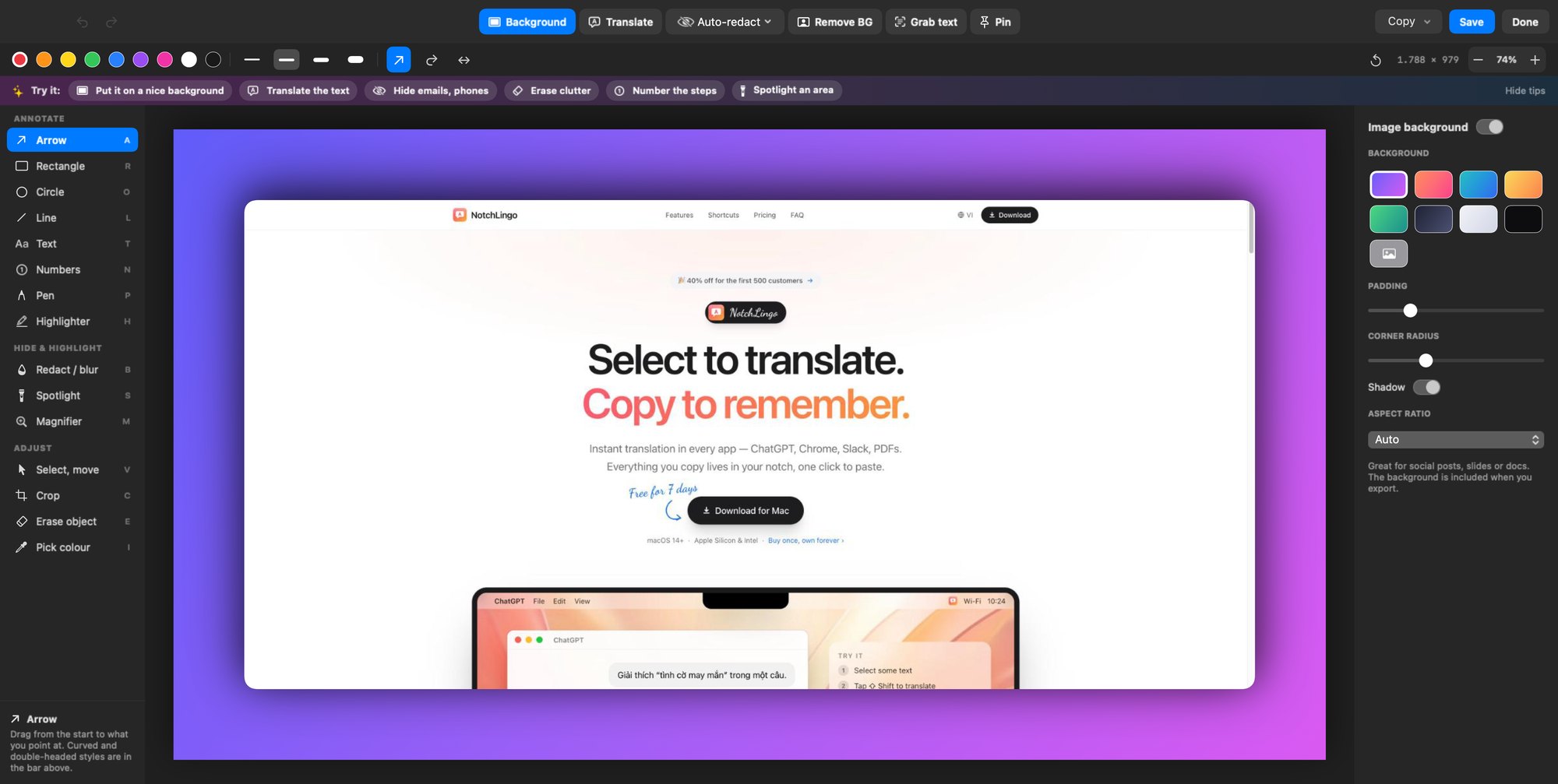
Real NotchLingo editor — every tool one key away.
New · Screen recording
Record the screen and the editor opens full-screen with smooth auto-zoom on every click. Add arrows, callouts, numbers and a spotlight that appear exactly when they matter, cut the boring bits, speed up the slow ones, then export a small MP4 or GIF. Works with videos you already have, too.
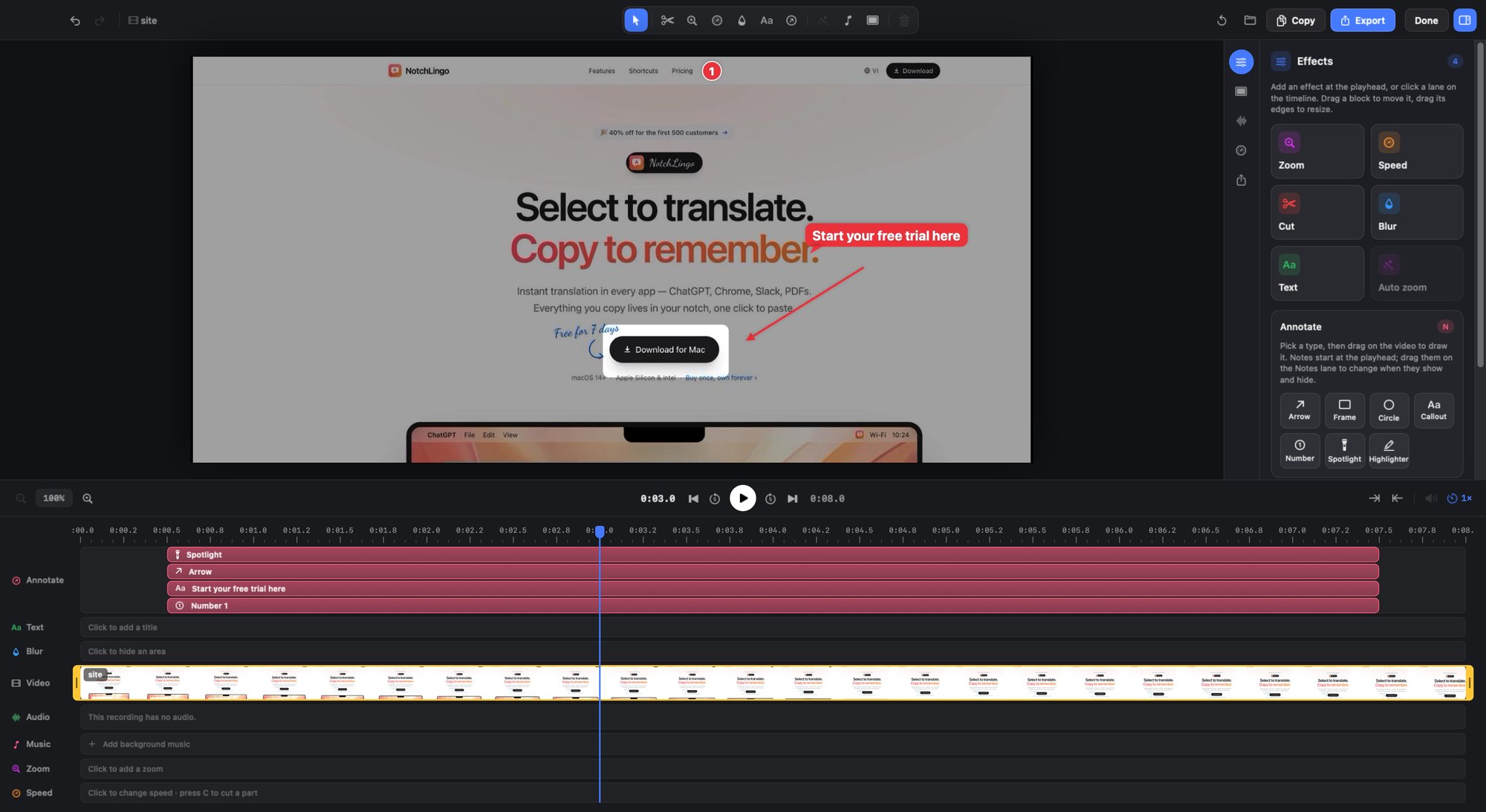
Notes show up at the right moment — and stay in the exported video.
新功能 · 会议记录
Zoom、Meet、Teams —— 按下 ⌥⇧6,通话旁边出现一个简洁的面板。说到哪里字就出现到哪里,按说话人清楚分开,需要时还能实时翻译。会议结束后,Apple Intelligence 在你的 Mac 上写好纪要。
Launch sync
Sam 00:03
Morning! Let's lock the launch date for version 1.2 today.
Me 00:09
I'd go for next Thursday — the build already passed QA.
Priya 00:16
Marketing needs two more days for the video and the App Store shots.
Sam 00:24
Okay, Monday it is. Priya, can you send the video draft by Friday, and the screenshots
你的话在一边,其他人的在另一边 —— 点一下名字即可改名。
每个操作都有快捷键,双手无需离开键盘。
选中文字后轻点 Shift 翻译
翻译所选内容
打开剪贴板历史
快速翻译框
粘贴第 1–9 项
翻译所选条目
开始 / 结束会议记录

在带刘海的 MacBook 上,NotchLingo 就住在刘海里。在没有刘海的显示器上(包括外接显示器),屏幕顶部居中会出现一个小胶囊,鼠标悬停即可展开。
历史记录只保存在你的 Mac 上。密码管理器中的密码绝不会被记录。你还可以随意排除任何 App。
可按月、按年付费,或一次付清终身使用。登录后即可在你所有的 Mac 上使用。支持银行卡(通过 Polar)或越南银行转账付款。
开始之前
几乎所有 App:ChatGPT、Chrome、Safari、Slack、Claude、VS Code、备忘录、邮件、PDF……NotchLingo 通过 macOS 辅助功能读取你选中的文字;如果某个 App 不支持,它会先复制,再恢复你的剪贴板。
没问题,NotchLingo 会在屏幕顶部居中显示一个小胶囊,鼠标悬停即可展开。
银行卡支付由 Polar(授权经销商,含税)处理。越南用户可通过 VietQR 银行转账付款。账号会立即激活,在应用中登录即可。
可以。所有方案都支持你的所有 Mac,只需用同一个账号登录即可。
可以——如果 NotchLingo 不适合你,14 天内全额退款。